Thank you to all who generously contributed to help BirdTrax keep running! The support of the community has been inspiring, and BirdTrax is running once again. If your gadget isn't working, just let me know (support@birdventurebirding.com). It's running live from http://www.tseep.com/birdtrax.xml.
BirdTrax is on a long-term hosting plan now and please stay in the loop and tuned for updates.
Wednesday, May 10

Tuesday, November 29
Update your BirdTrax Gadget Codes
As of Nov. 28, Accubirder.com is down for good. Hosting expenses got in the way. This has been a no-profit no-frills and therefore also a low-cost-only enterprise, so until I manage to get some funding, the Accubirder website tools will unfortunately not be available.
The BirdTrax and the Accubirder gadgets are a different story, however. These gadgets were hosted on the Accubirder.com website, but I have moved them to Google storage for now, I'll see how that works for the next few months. I have updated the BirdTrax embedder for now, I am still thinking about how best to handle the Accubirder transition. I am trying to work out a long-term solution where finances are not an issue.
As a better alternative, if you own a website and have the ability to host your own gadget source files, feel free to send me an email at support@birdventurebirding.com and I'll send you the code for these gadgets with instructions on how to get the gadget running. That way you can rely on yourself for gadget up-time.
The BirdTrax and the Accubirder gadgets are a different story, however. These gadgets were hosted on the Accubirder.com website, but I have moved them to Google storage for now, I'll see how that works for the next few months. I have updated the BirdTrax embedder for now, I am still thinking about how best to handle the Accubirder transition. I am trying to work out a long-term solution where finances are not an issue.
As a better alternative, if you own a website and have the ability to host your own gadget source files, feel free to send me an email at support@birdventurebirding.com and I'll send you the code for these gadgets with instructions on how to get the gadget running. That way you can rely on yourself for gadget up-time.
Friday, October 16
Free Code! Display eBird API data on your website!
Since BirdTrax is not a hard-code solution, I've copied some of my "practice code" into JSFiddle to make data display on your website easier. Here are three files so far, and I'll post as I make more:
Basic Sightings
This code very simply shows how to embed eBird data in your website in raw form.
Basic Sightings (more gourmet)
This code elaborates on Basic Sightings to create a more user-friendly output by doing a little bit of data processing.
Basic Rarities
This code does basically the same thing, just for a rarities API with a little more detail
Hope this helps!
Zach
Basic Sightings
This code very simply shows how to embed eBird data in your website in raw form.
Basic Sightings (more gourmet)
This code elaborates on Basic Sightings to create a more user-friendly output by doing a little bit of data processing.
Basic Rarities
This code does basically the same thing, just for a rarities API with a little more detail
Hope this helps!
Zach
Monday, September 7
Discontinuing BirdTrax Maintenance
Hello to the BirdTrax community,
I thought it would be about time to officially announce that I am discontinuing BirdTrax maintenance. BirdTrax will be going down on January 25, 2015. It's been a great gadget for tens of thousands of users for three years now, but an upgrade is on its way. Google keeps evolving and changing, and with it gadgets seem to be heading more and more towards the trash can. The gadget has been getting some rough edges, and it will be staying this way. I'm still happy to take a look at your codes and suggest fixes, but I won't be developing or maintaining further.
Good birding!
Zach DeBruine
I thought it would be about time to officially announce that I am discontinuing BirdTrax maintenance. BirdTrax will be going down on January 25, 2015. It's been a great gadget for tens of thousands of users for three years now, but an upgrade is on its way. Google keeps evolving and changing, and with it gadgets seem to be heading more and more towards the trash can. The gadget has been getting some rough edges, and it will be staying this way. I'm still happy to take a look at your codes and suggest fixes, but I won't be developing or maintaining further.
Good birding!
Zach DeBruine
Thursday, December 4
BirdTrax Update: What's Happening to the Checklist Tab?
eBird now offers an elegant interface for perusing recent checklists submitted in any county or state. If you haven't already, bookmark eBird's Region Explorer. It provides you with fast and easy access to a wealth of information.
BirdTrax requests information from eBird databases every time you load your gadget. An ever-growing community of BirdTrax users worldwide is beginning to make data requests overwhelming, thus it's time to direct your checklists tabs directly to eBird.
Important Note: If your gadget opens up in the checklist tab by default, you need to change that. If you are operating a personal gadget on Google Sites, for example, open up the preferences tab and change the default view setting. If you have embedded BirdTrax on your website, go back to the BirdTrax embed code generator and enter all the same information as before (only checklists is no longer an option for default view).
We appreciate your understanding and are grateful together with team eBird for your support and use of this wonderful dataset. We hope that you continue to enjoy the wide variety of data exploration tools available. More are on the way!! Just after New Years we'll put up a teaser here on the website for a new tool on track for release before Spring migration.
BirdTrax requests information from eBird databases every time you load your gadget. An ever-growing community of BirdTrax users worldwide is beginning to make data requests overwhelming, thus it's time to direct your checklists tabs directly to eBird.
Important Note: If your gadget opens up in the checklist tab by default, you need to change that. If you are operating a personal gadget on Google Sites, for example, open up the preferences tab and change the default view setting. If you have embedded BirdTrax on your website, go back to the BirdTrax embed code generator and enter all the same information as before (only checklists is no longer an option for default view).
We appreciate your understanding and are grateful together with team eBird for your support and use of this wonderful dataset. We hope that you continue to enjoy the wide variety of data exploration tools available. More are on the way!! Just after New Years we'll put up a teaser here on the website for a new tool on track for release before Spring migration.
Wednesday, August 6
Find those eBird Personal Locations that should be merged with Hotspots!!
eBird should totally, totally develop a tool that allows users to detect whether their personal locations are very near hotspots (or should be merged with the hotspot). Maybe they are working on that, but in the meantime here's a little app to help you clean up your locations and get your name on more Hotspot Explorer pages :)
Hotspot Alignment Tool
To use this program, download your eBird data (the link is in the My eBird page on the right toolbar), then upload that file directly to the page.
This is just a primitive idea of what a tool like this really ought to do, but I just wanted to share this little functionality with the eBirders out there in case it can be useful.
To use this program, download your eBird data (the link is in the My eBird page on the right toolbar), then upload that file directly to the page.
This is just a primitive idea of what a tool like this really ought to do, but I just wanted to share this little functionality with the eBirders out there in case it can be useful.
Saturday, May 24
Added Language Support for BirdTrax
Species names in BirdTrax can now be viewed in French and Spanish in addition to English! This was in high demand for a long time, so I anticipate much excitement. I hope this new possibility will provide impetus for further growth in eBird participation worldwide. When embedding BirdTrax, simply select from a choice of languages (option beneath country drop-down box). If you have any questions, please feel free to contact me at support@birdventurebirding.com.
The new "Espanol (MX)" eBird Gadget!
On a side note, I could use some help translating the basic text of BirdTrax into Spanish. I have received French and Portuguese assistance, but would greatly appreciate an email with the translations of non-species text used in the gadget from users who are fluent/comfortable in Spanish. I will keep this request updated once I obtain the information I need to proceed.
Embed a BirdTrax Gadget on your website by clicking here or add it to your Google Site.
On a side note, I could use some help translating the basic text of BirdTrax into Spanish. I have received French and Portuguese assistance, but would greatly appreciate an email with the translations of non-species text used in the gadget from users who are fluent/comfortable in Spanish. I will keep this request updated once I obtain the information I need to proceed.
Monday, October 21
Google Sites: The Best Way to View BirdTrax Gadgets
My favorite way to view a collage of personal BirdTrax gadgets is using Google Sites.
To begin, go to:
sites.google.com
Here's a sample site for you to check out:
BirdTrax Demo Dashboard

To begin, go to:
- Create a new site. Simply click "create". You can fiddle around with style all you like, but I just selected "blank template". Once you finish up on that page, you should have a new website.
- Edit your page. Click on the pencil in the upper right area of the page.
- Add a BirdTrax gadget. In the upper left menu bar, hover over "insert" and then click on "more gadgets...". Click on "add gadget by URL" and enter the following URL:
https://storage.googleapis.com/accubirder/birdtrax.xml
- Customize your gadget. Type in your settings as you so desire, and when you click OK, you'll have inserted your first BirdTrax gadget into the site.
Here's a sample site for you to check out:

Update Your BirdTrax Embed Code
If BirdTrax is embedded on your website, it may disappear on November 1 -- You need to follow the simple instructions in this post to keep it running!!!
On November 1, iGoogle will be retired. The BirdTrax gadget is hosted on an iGoogle directory, so it may no longer be available from the current URL. But no worries, BirdTrax is now hosted on Google Code, so here's what you need to do:
Update your gadget embed code. It should look something like this:
You need to update the script source and its URL attribute from:
If you make this simple replacement, your gadget will perform equally well (and perhaps load even faster) than before.
BirdTrax is now hosted on Google Code, a reliable and fast server which is capable of managing the steady stream of code requests from the thousands of websites which use BirdTrax.
If you are unsure how to do this, you can use the BirdTrax Website Embedder Code Generator (the output has been updated). Using the code from this tool will do the same thing as is described above, and will keep your gadget working after November 1.
I apologize for this inconvenience. Please let me know if you have any issues!
On November 1, iGoogle will be retired. The BirdTrax gadget is hosted on an iGoogle directory, so it may no longer be available from the current URL. But no worries, BirdTrax is now hosted on Google Code, so here's what you need to do:
Update your gadget embed code. It should look something like this:
<script src="//www.gmodules.com/ig/ifr?url=http://hosting.gmodules.com/ig/gadgets/file/101708404408406792358/BirdTrax.xml&up_latlng=42.461381%2C%20-76.50454&up_radius=15&up_daysBack=30&up_locName=Ithaca%2C%20NY&up_districtName=&up_State=Hawaii&up_countryCode=US&up_defaultMode=area&up_defaultview=sightings&up_spuhs=0&up_picture=1&up_hideNavMenu=1&up_showhide=2&up_hide2=european%20starling%2C%20house%20sparrow%2C%20rock%20pigeon&synd=open&w=375&h=450&title=BirdTrax&border=%23ffffff%7C3px%2C1px+solid+%23999999&output=js"></script>
//www.gmodules.com/ig/ifr?url=http://hosting.gmodules.com/ig/gadgets/file/101708404408406792358/BirdTrax.xml
to:
https://t5653i60o7fjia2l6tulcflglc5fn3q0-a-sites-opensocial.googleusercontent.com/gadgets/ifr?url=http://tseep.com/birdtrax.xml
If you make this simple replacement, your gadget will perform equally well (and perhaps load even faster) than before.
BirdTrax is now hosted on Google Code, a reliable and fast server which is capable of managing the steady stream of code requests from the thousands of websites which use BirdTrax.
If you are unsure how to do this, you can use the BirdTrax Website Embedder Code Generator (the output has been updated). Using the code from this tool will do the same thing as is described above, and will keep your gadget working after November 1.
I apologize for this inconvenience. Please let me know if you have any issues!
Friday, June 14
eBird Checklist Map
Yesterday I threw some code together that generates a map of all eBird checklists submitted in my area.

I haven't had time to perfect the idea yet, and I may add a few more features. In the meantime, here's how you can do this too:

Wednesday, April 24
Map your eBird History!
Here's an awesome new map of personal eBird checklist submissions over time from Brian Sullivan:
http://geocommons.com/maps/252746
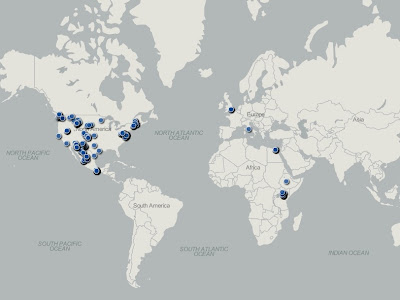
Thanks to Jared Fischer for the idea and development work!
Here's how to do this:

Thanks to Jared Fischer for the idea and development work!
Here's how to do this:
Friday, January 4
BirdTrax Website Embedder
Here's a simple tool to help you embed BirdTrax on your website. Fill in the information below, then click "Get Code!" to copy the code you need to paste on your website to place the gadget. If you encounter any issues, please comment or email me.
Tuesday, December 4
Make your own LifeMap from your eBird Data
In about 10-20 minutes, depending on your proficiency with technology, you can put together a map showing your worldwide travel routes based on your eBird data. This is awesome for travelogues, date error detection in data cleanup, and quite frankly, it's cause for a good sense of personal satisfaction.
 |
| My eBird Record of 2 Weeks in Europe |
Tuesday, July 17
Tutorial: Embed eBird Rarities Data on your Website
If you're a web-developer, programmer, website owner, or blogger, you may wish to embed eBird Data on your website. What are the advantages?
Goal:
Using eBird APIs, a set of XML databases containing recent bird observations, we'll output the latest rarities in a region and give it a little formatting. In the end, your result should look something like this:

- Fast download time, much faster than a Google Gadget
- Flexible design, so you can customize it so it blends into your website
- You can write your code in JavaScript, an easy-to-learn and easy-to-use programming language
Goal:
Using eBird APIs, a set of XML databases containing recent bird observations, we'll output the latest rarities in a region and give it a little formatting. In the end, your result should look something like this:

Friday, July 13
Embed Google Maps in eBird Checklist Comments!
 |
| View Checklist: S10505942 |
But technology is better than that. Just embed that Google Map into your eBird comment! Why not? It's easy, fast, and beautiful!
I've built an automated code generator below which spits out an image code you can copy into your eBird comments. You can now have a Google Map embedded in your checklists comments in less than 1 minute. It will look just like the checklist on the right.
Tuesday, July 10
Introducing BirdTrax
BirdTrax is intended to overtake the old eBird Recent Sightings Gadget, though it is released separately. New in this release is the checklist functionality, and the ability to view sightings, rarities, and checklists for your county and state in addition to just the circular area surrounding a point.
Visit the BirdTrax Page for Information
So, swap your web gadgets today and take advantage of the latest features!
Embed on Website
Tuesday, August 2
Photos in eBird Comments!
Today I just realized that I can incorporate HTML into my eBird comments! This enables me to format text, insert line breaks, and even display photos using references to other websites! Here is an example checklist:
http://ebird.org/ebird/view/checklist?subID=S6827507
I used a photo I uploaded to the internet (my blog), and used the HTML![]() tag to display it in the species comments! This is the code I typed into the comments box:
tag to display it in the species comments! This is the code I typed into the comments box:
<img src="https://blogger.googleusercontent.com/img/b/R29vZ2xl/AVvXsEj4E-jQYwbwPfwo0ui5h_0Mab57TeUvni0YPcLYHt8XwNpumKBgfRfB441kFN_66SElieLymMuM2MYuk7WAptDaHwdzDW1ehLHrlIcYYV9bZdKCs-k-r9yrirphtlmRoU-dYjPetltcIDL4/s400/Male+and+Female+-+2.JPG" style="width:200px;height:150px;" />
To learn how to use HTML (it's very easy), go to W3Schools HTML tutorials.
http://ebird.org/ebird/view/checklist?subID=S6827507
I used a photo I uploaded to the internet (my blog), and used the HTML
<img src="https://blogger.googleusercontent.com/img/b/R29vZ2xl/AVvXsEj4E-jQYwbwPfwo0ui5h_0Mab57TeUvni0YPcLYHt8XwNpumKBgfRfB441kFN_66SElieLymMuM2MYuk7WAptDaHwdzDW1ehLHrlIcYYV9bZdKCs-k-r9yrirphtlmRoU-dYjPetltcIDL4/s400/Male+and+Female+-+2.JPG" style="width:200px;height:150px;" />
To learn how to use HTML (it's very easy), go to W3Schools HTML tutorials.
Example eBird Checklist


Subscribe to:
Posts (Atom)